
The complete MoSKito integration guide – Step 5 – MoSKito-Central in remote mode
In the previous step we integrated MoSKito-Central in embedded mode, today is exactly the promised fine day to integrate MoSKito-Central in remote (standalone) mode.
You may ask “Why do we need it?”, the answer is: our **burgershop **has become a real empire with multiple application instances and we want to monitor all of them and consolidate the obtained performance data in one place.
So, let’s start!\
I. Adding dependencies
    org.moskito
    moskito-central-rest-connector
    ${moskito-central.version}
We’re just adding a dependency for the remote connector, removing moskito-central-storages and moskito-central-embedded-connector, since we don’t need them anymore.
II. Adding configurations
Now we ask our MoSKitorized app to use the remote connector and tell the app where to connect it.
In moskito.json, write RESTRemoteConnector instead of EmbeddedCentralConnector.
moskito.json
{
    "@pluginsConfig": {
        "@plugins": [
            {
                "name": "RESTRemoteCentralConnector",
                "configurationName": "rest-connector",
                "className": "org.moskito.central.connectors.rest.RESTConnector"
            }
        ]
    }

}
Now add config for rest-connector:
rest-connector.json
{
    host: "localhost",
    port: 8080,
    resourcePath: "/moskito-central/central/addSnapshot"
}
This config says where to connect.
We also remove moskito-central, moskito-csv and moskito-fs configs from the shop and will configure them in the section below.
III. Configure standalone MoSKito-Central web app
To configure our remote web app, it would be nice to get it before 🙂
Download the latest version of moskito-central-rest-webapp from Maven: http://search.maven.org/#search%7Cga%7C1%7Cmoskito-central, unpack, make changes to configs, and pack again.
Or, get the project from github:
git clone https://github.com/anotheria/moskito-central
cd moskito-central/moskito-central-server/moskito-central-rest-webapp/
Configure storages in the same way as in embedded mode.
moskito-central.json
{
    "@storages": [
        {
            "name": "json-file",
            "clazz": "org.moskito.central.storage.fs.FileSystemStorage",
            "configName": "moskito-fs"
        },
        {
            "name": "csv-file",
            "clazz": "org.moskito.central.storage.fs.CSVFileStorage",
            "configName": "moskito-csv"
        }
    ]
}
moskito-fs.json
{
    "pattern": "/tmp/moskito-central/json/{host}/{component}/{producer}/{interval}/{date}/{date}_{time}_{producer}.json",
    "serializer": "org.moskito.central.storage.serializer.GsonSerializer",
    "includeIntervals": "*",
    "excludeIntervals": "15m",
    "includeProducers": "*",
    "excludeProducers": ""
}
moskito-csv.json
{
    "pattern": "/tmp/moskito-central/csv/{host}/{component}/{producer}/{interval}/{producer}_{stat}.csv",
    "@entries": [
        {
            "includedProducers": "SessionCount",
            "includedStats": "*",
            "includedIntervals": "*"
        },
        {
            "includedProducers": "RequestURIFilter",
            "includedStats": "cumulated",
            "includedIntervals": "5m,1h"
        },
        {
            "includedProducers": "sales",
            "includedStats": "*",
            "includedIntervals": "1m,1h"
        }
    ]
}
IV. Run folks run!
Rebuild the shop and moskito-central-rest-webapp (if you have downloaded the source code) and** **deploy both applications.
Again, order your favourite burger if you have one, or just trust our choice 😉
http://localhost:8080/burgershop/order.html?choice1=brioche&choice2=dog&choice3=cockroach
http://localhost:8080/burgershop/order.html?choice1=brioche&choice2=lamb&choice3=cockroach
In a moment, you’ll find new directories and data files in your local /tmp/moskito-central folder.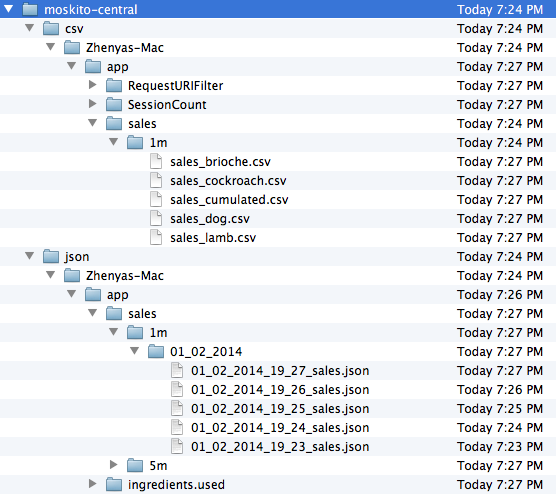
Voila … done!
A couple of notices to finish it all:
- If you run two or more instances of the shop, the data will also be written to the same folders and files. For possible storage configurations, please look at Configure MoSKito-Central Storage.
- Today’s example was based on REST EndPoints for receiving data from our shop, another supported variant is based on DistributeMe, for details please check Setting Up MoSKito-Central in Remote Mode.
That’s is all for today, to sum it up: we have successfully integrated MoSKito-Central in the remote mode.
Enjoy, and see you!
The complete MoSKito integration guide – Step 4 – Central storage
Today we are going to unlock even more MoSKito power: more persisting, more centralising. As you know, we can access MoSKito producer’s statistics while application is running:...
The complete MoSKito integration guide – Step 6 – Watching the big app with MoSKito-Control
In all previous steps , we integrated MoSKito into our application and set up data storage. In simple words, we learned how to monitor our app’s performance and store the obtained...