
Connect Moskito-Central to MongoDB
Today we are going to connect MoSKito-Central to MongoDB database.
In a few words, MoSKito-Central is a service (remote or** embedded**) that receives your MoSKito statistics and stores it in the place of your choice (Filesystem, Database, …).
Our choice for now is MongoDB and MoSKito-Central in embedded mode.
Before we start, you need to have our test-application the **burgershop **locally in a proper state, so just perform following steps:
TABLE
I. Adding dependencies
TABLE
In this step we’re adding the dependencies for embedded-connector and storages.
II. Adding configurations
First of all we need to create *resources *directory and put some new config files there.
TABLE
moskito.json\
TABLE
This config sets the embedded MoSKito-Central connector to the our burgershop.
moskito-central.json
TABLE
*moskito-central.json *configures the list of storages (config file name and implementation class), in our case we configure one MongoDB storage. For a full storages list, please check documentation or sources.
moskito-mongoDB.json
TABLE
With this, we configure our MongoDB storage. Set **distributeProducers **to “true” and every producer will be stored in it’s own collection, if not – collectionName will be used to store snapshots into one named collection of your Mongo database.
III. Run it!
Build the **burgershop, **deploy it and, of course, don’t forget to order some new burgers 🙂
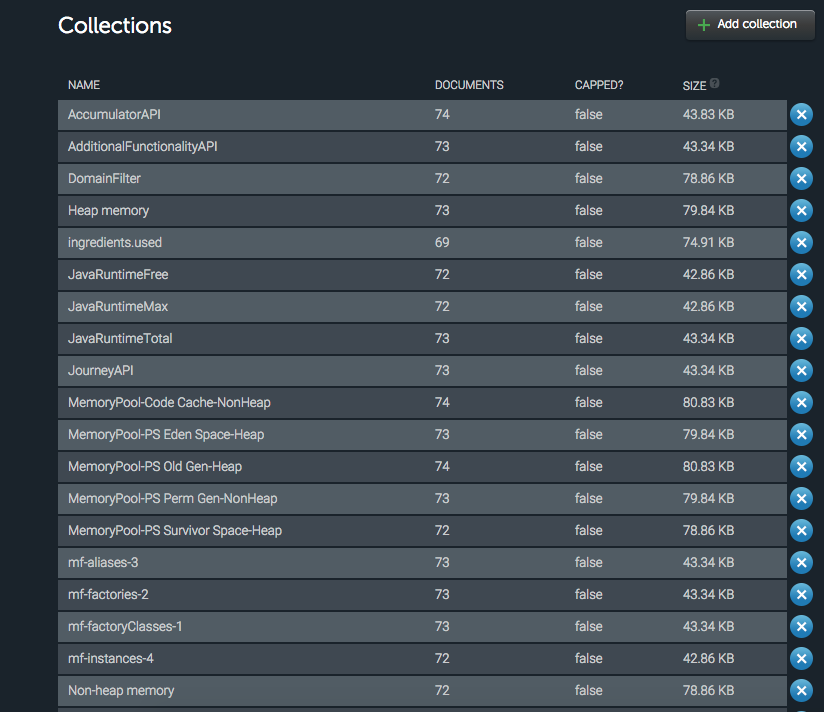
After a couple of minutes, you’ll find a new stored data in your MongoDB database.
It’s looks like this:
Enjoy!
Enable logback in JBoss
About 10 years ago log4j was the logging framework for java. Years passed and many logging frameworks emerged. For many people, including myself, logback is the new log4j (and...
Newest. Hottest. Tracers.
Today MoSKito 2.7.3 is released, and it contains the hottest feature since long time. But decide for yourself. The feature request goes back some years to Dec 02, 2010 to my time...